A. Get (and Answer) Walmart, eBay and Amazon Messages in Zendesk
ChannelReply sends all your Walmart, eBay and Amazon buyer messages to Zendesk.
It also lets you answer them from Zendesk. Replying works just like answering an email.
You can easily use all your normal Zendesk tools like macros when replying.
B. Thread Conversations
ChannelReply threads conversations. That means the customer’s messages and your replies appear together in one Zendesk ticket, in chronological order.
This works the same way for Amazon, eBay and Walmart tickets.
Q. How do you decide which messages should appear in the same ticket?
Messages thread according to user. So, if a customer writes to you about different orders, those messages will still appear together in one ticket.
Note that if you close a Zendesk ticket, it can no longer accept new messages. A follow-up ticket will be created if the customer replies to a closed ticket.
Q. Messages aren’t threaded like this on eBay. What happens if an eBay buyer sends me two or three messages before I reply?
When an eBay buyer sends you more than one message in a row, we deliver your reply to the most recent message they sent.
There will be no response to the older eBay messages shown in that Zendesk ticket. However, those older messages will be marked as read, which is all that eBay requires.
C. Mark Messages as Read / No Response Needed
eBay
When you open an eBay ticket in Zendesk, the ChannelReply app will load in the right-hand sidebar. We mark all eBay messages in the ticket as read as soon as the app loads.
Q. Are eBay messages marked as read whenever you mark the Zendesk ticket as solved or closed?
No. It’s important to open eBay tickets manually and actually read them. It’s what eBay and your customers want. If you do this with the ChannelReply app installed, all your messages should always be marked as read on eBay.
If you auto-close or mass close eBay tickets without reading them, they won’t be marked as read.
Amazon
The ChannelReply app includes a “MARK AS ‘NO RESPONSE NEEDED’ ” button on Amazon tickets. As you’ve probably guessed, clicking this marks the conversation as “no response needed” on Amazon. That stops the clock on Amazon’s 24-hour response time SLA.
Q. Are Amazon messages marked as “No response needed” whenever you mark the Zendesk ticket as solved or closed?
No. You must either reply to the message or click “MARK AS ‘NO RESPONSE NEEDED.’ ”
D. Report Suspicious Amazon Messages
Need to flag a scam on Amazon? Just hit the “REPORT SUSPICIOUS MESSAGE” button at the bottom of the ChannelReply app.
2. Multichannel Support
A. Integrate with Multiple Accounts and Marketplaces
All ChannelReply plans (including the free trial) can link with unlimited Walmart, eBay and Amazon accounts.
eBay is supported across the globe—no matter where you sell on eBay, you can use ChannelReply and Zendesk!
ChannelReply supports all Amazon Seller Central marketplaces that have an API integration. All the following are supported:
Australia
Brazil
Canada
Egypt
France
Germany
India
Italy
Japan
Mexico
Netherlands
Saudi Arabia
Singapore
Spain
Turkey
United Arab Emirates (UAE)
United Kingdom (UK)
United States (USA)
Note that only Seller Central is supported at this time. ChannelReply is not compatible with Amazon Vendor Central.
For Walmart, we only support the US at this time, but we hope to add other marketplaces in the near future.
B. Integrate with Other Channels via Zendesk
ChannelReply only integrates eBay, Walmart and Amazon with Zendesk. However, Zendesk can pull in your messages from all kinds of other channels! Here are a few Zendesk integrations you might find helpful:
Check out Zendesk Marketplace to see more of the hundreds of integrations available in Zendesk.
C. Identify and Organize Tickets
Q. How do you know which ticket came from which eBay account?
Q. How do you separate your Amazon tickets from everything else?
Q. How can you tell a trigger or automation to only apply to tickets from a specific Walmart account?
The answer for all three questions is the same: tags.
ChannelReply lets you assign a tag to each eBay, Walmart or Amazon account you connect.
That tag will appear on every message ChannelReply delivers from that account.
You can use tags to create Zendesk views according to your needs. Use these to see only the tickets you want to see. Many of our users create one view just for eBay, for example:
Then they create a separate view for Amazon, another for Walmart, and another for non-marketplace messages.
But that’s just one example. Views are extremely customizable, and you can organize your tickets any way you want! Tags make it easy.
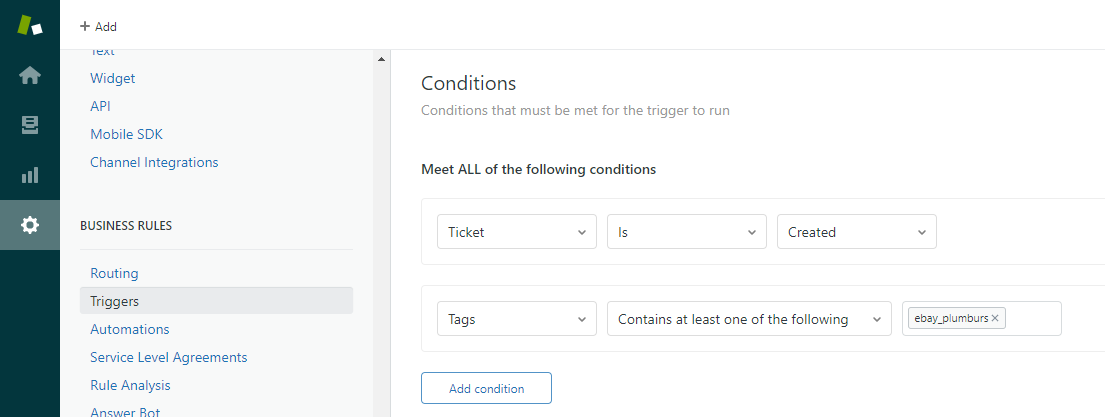
You can also use tags in conditions for triggers and automations.
Or, you can just let tags appear in the sidebar as a handy way to identify the source of the ticket.
“inquiry” on eBay Resolution Center inquiries and Item Not Received disputes.
“case” on escalated eBay Resolution Center cases.
“return” on eBay return requests and events.
"neworder" on eBay New Order notifications.
“negative” and “feedback” on Amazon Negative Feedback notifications.
These will help you tell these tickets apart from your buyer messages. You can also use them in views and triggers, of course!
With Amazon, each marketplace is treated as a separate account and can have its own tag. That means you can have different tags for Amazon UK and Amazon DE, for example.
D. Create Custom Signatures for Each Account
You can create a unique signature for each Amazon, eBay or Walmart account you connect to ChannelReply.
There are just two important things to consider when using these signatures:
They do not replace your signature in Zendesk. If you create a signature in both ChannelReply and Zendesk, both signatures will appear on your messages.
They should not include links. Most marketplaces have rules against including almost any kind of link in messages to buyers.
Also, note that ChannelReply signatures will not appear in Zendesk. We add them after your replies leave Zendesk and go to our system. You will only see the signatures if you look at your replies on Amazon, eBay or Walmart.
Zendesk’s signatures are quite advanced. You can create a universal signature for your whole company and individual signatures for your agents.
If your account supports the multi-brand feature, you can also create a unique signature for each account from within Zendesk. All three of these Zendesk signature types can appear together, in addition to the ChannelReply signature.
That’s a lot more than most people need! But, it means you have four different building blocks for creating highly specific signatures. For example, each agent could have…
Their name as their agent signature.
A universal signoff (like “All the best!”).
The name of the specific eBay or Amazon account.
Um… I’m not sure why you’d really need a fourth signature block, but it’s there!
Still not customized enough? Jeez, tough crowd. You can always use apps like Zignatures to tinker with your signatures until they’re more advanced than spacecraft.
3. Buyer and Order Info
A. Eliminate Clutter in Messages
If you forward messages from Amazon, eBay or Walmart directly to Zendesk, they appear with all kinds of data just lumped into the body of the message. In fact, there’s so much clutter that the Amazon message “Test message from Amazon to Zendesk” takes up more than two full screens on a laptop:
eBay takes up the same amount of space while being even more confusing:
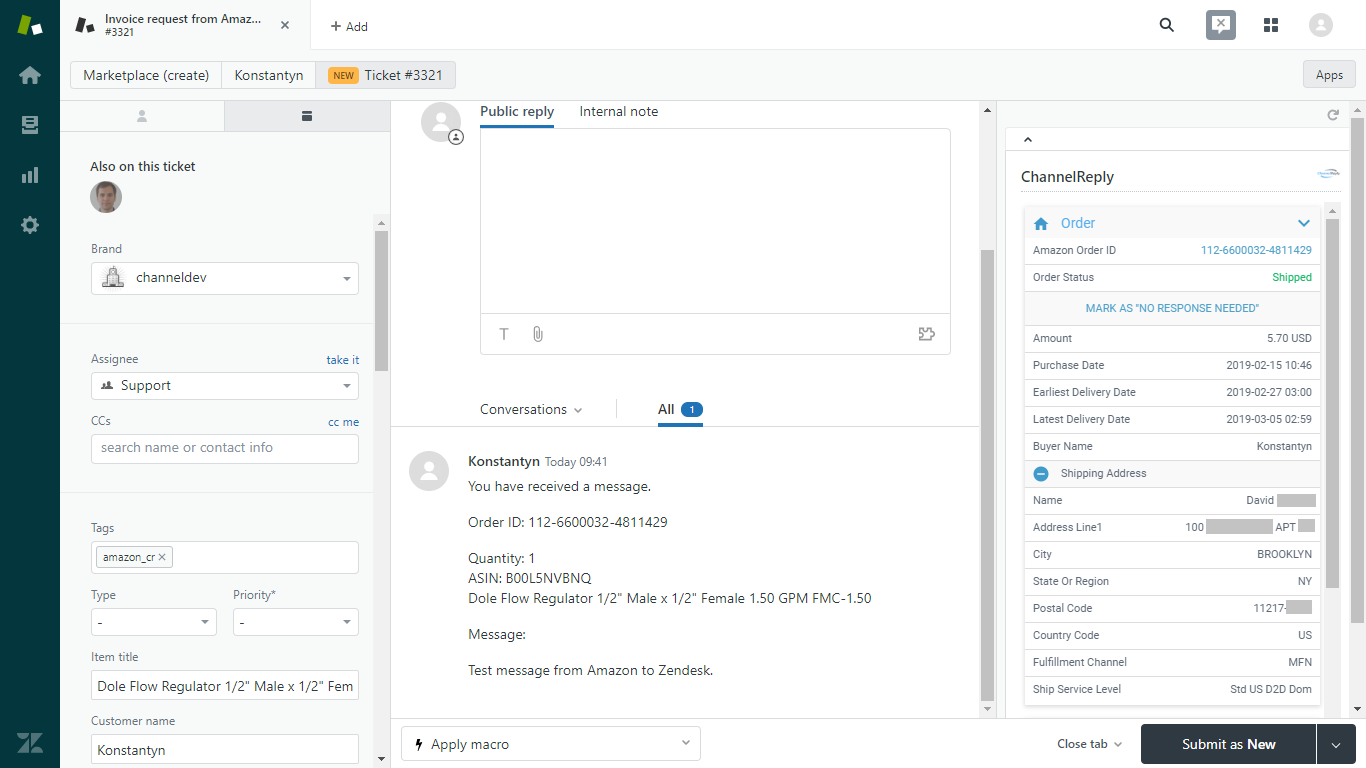
ChannelReply makes your messages much more readable by pulling all that clutter out. Here’s the same Amazon message from above, delivered via ChannelReply:
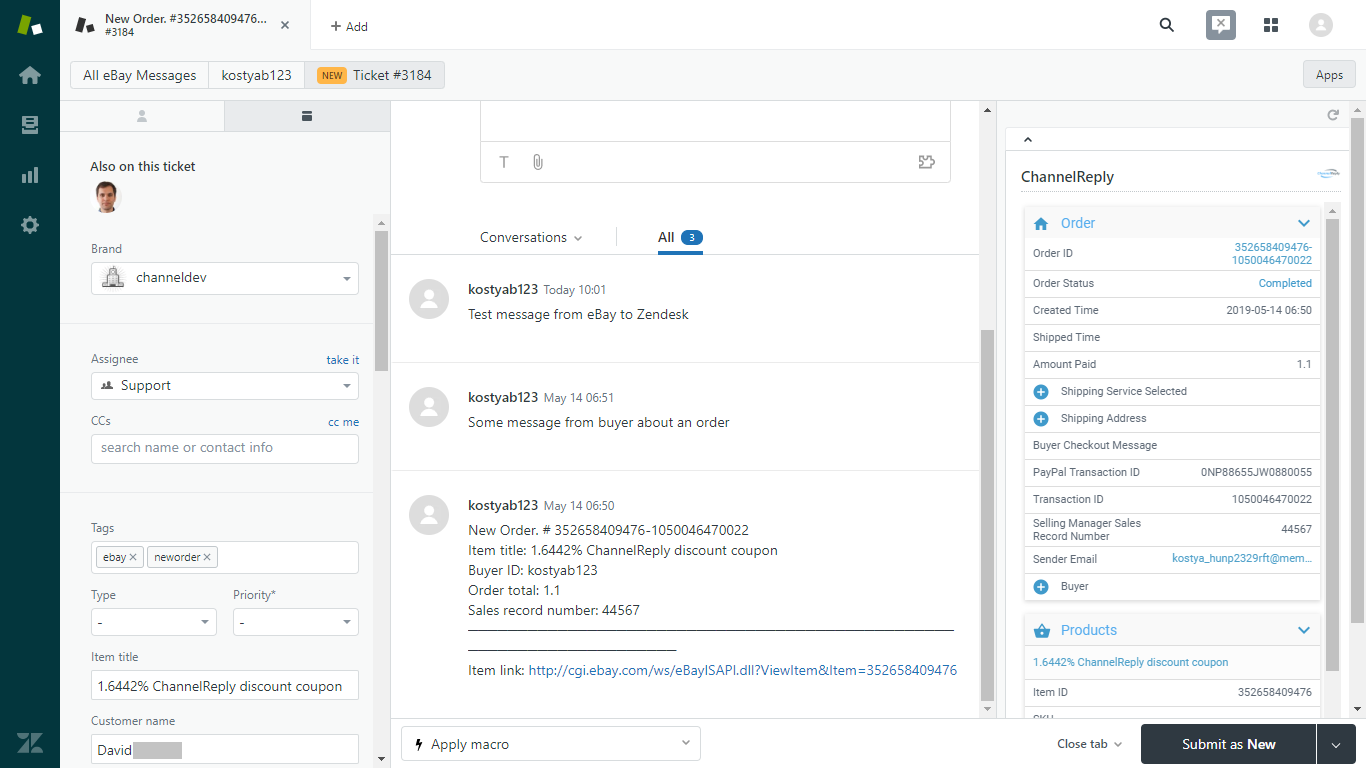
And here’s the eBay message:
But what happens to all the data and helpful links from the original message that you actually want to get? No worries—they’re all repurposed and added to even more info pulled straight from the marketplaces. We let you…
B. See Customer and Order Details from eBay, Amazon and Walmart in the ChannelReply App
The ChannelReply app for Zendesk provides all the information listed below. When you open a ticket in Zendesk, it will be visible in the right-hand sidebar. All this data is refreshed every time you open a ticket.
eBay
Order Data
Order ID
Order Status (on orders, this can be Active, Cancelled, Cancel Pending, Completed, Custom Code, or In Process; on returns, it can be Return Created, Return Waiting for Seller Info, Return Seller Info Overdue, Return Shipped, Return Delivered, Return Refund Overdue, Return Closed, or Return Escalated)
Created Time (the time and date the order was created)
Purchase Date (the time and date the customer actually paid)
Street2 (address line 2—only appears if this line exists)
City Name
State or Province
Country Name
Phone
Postal Code
Buyer Checkout Message
PayPal Transaction ID
Transaction ID (assigned by eBay)
Selling Manager Sales Record Number
Sender Email (the buyer’s eBay member email address)
Buyer Data
User ID (the buyer’s eBay username)
Location (town, state/province, country)
Registration Date
Positive Feedback Percent
Feedback Score
Email (the buyer’s real email address)
User First Name
User Last Name
Products Data
Item Title (links to listing page)
Item ID
SKU
Variation SKU
Quantity Purchased
View Item URL
Status (ChannelReply integration info)
eBay Account Tag
Renew eBay Token (link—allows you to renew the integration as needed once every 12 to 18 months)
Messages Count (shows how close you are to your monthly message limit: green if you have plenty to go, yellow if approaching your limit, and red if at or above your limit)
Contact ChannelReply Support (link)
Amazon
Order Data
Amazon Order ID
Order Status (Pending Availability, Pending, Unshipped, Partially Shipped, Shipped, Delivered, Invoice Unconfirmed, Cancelled, or Unfulfillable)
Merchant Order ID
Merchant Order Item ID
Amount (total paid, includes everything—item total, shipping, taxes, etc.)
Delivery Level (Prime, Premium or Standard—added 2/6/2020 and not pictured above)
Purchase Date
Buyer Name
Shipping Address
Name (may sometimes be withheld by Amazon)
Address Line1 (may sometimes be withheld by Amazon)
Address Line2 (only appears if this line exists)
City
State or Region
Postal Code
Country Code
Fulfillment Channel
Ship Service Level
Products Data
Item Title (links to listing page)
ASIN
Seller SKU
Quantity Ordered
Item Price
Status (ChannelReply integration info)Messages count (shows how close you are to your monthly message limit: green if you have plenty to go, yellow if approaching your limit, and red if at or above your limit)
Contact ChannelReply Support (link)
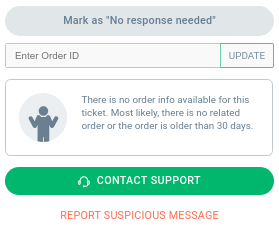
It's also worth noting that Amazon comes with a bonus feature. If ChannelReply is unable to identify the order associated with an Amazon message, you can manually enter the order ID.
This ensures that you can always get the order information in Zendesk, even if the conversation began on Amazon before you finished setting up ChannelReply.
Walmart
Order Data
Order ID
Customer Order ID
Order Status (e.g. Shipped)
Purchase Date
Amount (total paid for the order)
Shipping Address
Name
Address
City
State
Postal Code
Address Type (e.g. RESIDENTIAL)
Phone
Carrier
Tracking ID
Tracking URL
Fulfillment Option (e.g. S2H for “ship to home”)
Pick Up Date
Estimated Delivery Date
Estimated Ship Date
Shipment Date
Buyer Name
Buyer Email
Product Data (available for each product in the order):
Item Title
SKU
Amount (total paid for the item)
Status (e.g. Shipped)
Tax
Quantity
Line Number (indicates the item’s place in the list of all items in the customer’s order)
Returns
Return ID
Estimated Refund Amount
Buyer Name
Status (e.g. Shipped)
Shipping Address
Customer Order ID
Return Lines (indicates the item’s place in the list of all items the customer is returning)
Return Channel
Return Order Date
Return By Date
Refund Mode
Pick Up By
Buyer Email Address
C. Import eBay, Amazon and Walmart Buyer and Order Data into Zendesk via Custom Fields
ChannelReply can send the following eBay, Amazon and Walmart data into Zendesk custom fields:
Item Title
Order ID
Order Status (Pending, Unshipped, Shipped, etc.)
Order Total
Customer Full Name
Customer First Name
Customer Last Name
eBay User ID
Shipping Address
eBay Buyer's Location
Shipping Address Name
Buyer's Phone Number
Original Email Address
Shipping Carrier (not yet available for Amazon MFN orders)
Purchase Date
Earliest Ship Date
Latest Ship Date (does not populate on Walmart orders)
Shipment Date
Earliest Delivery Date
Latest Delivery Date (does not populate on Walmart orders)
Tracking ID (not yet available for Amazon MFN orders)
eBay Transaction ID
eBay Sales Record Number
Amazon Fulfillment Channel (MFN or FBA)
ASIN
eBay Item ID
SKU
Variation SKU
Tax Classification Number: CPF (shows the CPF for transactions in Brazil)
eBay Message ID
Walmart Customer Order ID or eBay Extended Order ID
Note: Amazon sometimes withholds information for fields like Customer Full Name and Buyer's Phone Number due to their strict privacy rules.
D. Make eBay, Walmart and Amazon Data Searchable in Zendesk
Information in the ChannelReply app is entirely contained in the app and not searchable in Zendesk. However, when you set up a custom field in ChannelReply, it will appear in the left-hand sidebar in Zendesk. It then becomes searchable.
The custom fields shown on the left are all searchable.
This data will be refreshed whenever you open a ticket and allow the ChannelReply app to load.
Want permanent custom field data? You can use the “Duplicate custom field to message body” option. This will cause the custom field to appear in the first message the buyer sends you in each ticket. The buyer won’t see this data, but you will. It will stay on your ticket permanently, never getting updated, and you’ll be able to find it in your Zendesk searches.
Zendesk macros are basically superpowered canned replies. In addition to inserting prewritten responses, they can perform actions like:
Changing the ticket’s priority.
Assigning it to a new agent.
Adding a CC.
You can add any ChannelReply custom field into your Zendesk macros.
Let’s say you wanted a canned reply that thanked the user by name for ordering a specific item. You could use the “Customer First Name” and “Item Title” custom fields as placeholders in a macro.
We added some other custom fields just to show off.
When you entered the macro on a ticket, the “Customer First Name” placeholder would change into the user’s first name. “Item Title” would change into (you guessed it) the item’s actual title!
Custom fields can be used in Zendesk triggers, but this feature is pretty limited. You can only base a trigger on whether a custom field is present or not (as in, whether data is available or the field is just blank).
This does have some practical application. If you wanted to send an automated reply that mentioned the order total, but didn’t want to send it if that amount was unavailable and the field would be blank, you could build this kind of trigger.
However, there is a workaround for building triggers based on specific custom field data!
Zendesk triggers can pick up on specific contents in a message. That means you can use the “Duplicate custom field to message body” feature discussed previously to set up a trigger.
Say you duplicated the SKU custom field to the message body. You could then build a trigger that only goes off if a message contains that SKU.
This has enormous potential if used well. Here are a few ideas:
Notify your fulfillment team if a customer contacts you about an order that hasn’t shipped yet.
Send a special thank-you to customers who order one of your most expensive items.
Auto-assign tickets to agents who specialize in the type of item ordered.
Have a specific trigger in mind but not sure how to build it? Contact us and we’ll be happy to help!
4. Notifications
A. Forward Standard eBay and Amazon Notifications to Zendesk
You know how eBay and Amazon send you emails about things like new orders, Resolution Center cases / A-to-z claims, and other important events? You can send all those emails to Zendesk—it’s just a question of setting up email forwarding.
Notifications sent through standard email forwarding do not count as messages in ChannelReply. No need to worry about automatic emails using up all your monthly messages!
With Amazon, it’s possible to send these notifications through standard email or through ChannelReply. Sending them through ChannelReply will cause them to count toward your monthly limit. But, whenever customer or order data is available, we’ll show it in the ChannelReply app.
What about Walmart? It should be just as easy as for Amazon and eBay, but we need testers to help us prove our ideas will work! Contact us if you'd like help forwarding Walmart notifications to Zendesk.
B. Get Interactive Notifications for eBay
ChannelReply can create special notifications for certain eBay events:
New Orders
Inquiries
Cases
Returns
These allow you to perform actions and/or send replies from inside Zendesk.
Order Notifications
You can have ChannelReply generate a notification for each new order you receive from eBay. Unlike normal eBay order notifications, you can respond to these from your Zendesk account.
This is a major improvement. It means you can contact an eBay customer who hasn’t sent you a message yet. If you want, you can also create an autoresponder that sends out thank-you messages for every order you receive.
Resolution Center Support
ChannelReply can generate eBay Resolution Center inquiry, case and return notifications. You can use these to perform the following actions directly from Zendesk:
Inquiries
Reply to inquiries like normal Zendesk tickets.
Issue a refund.
Provide refund info.
Provide shipment info.
Cases
Discuss the case using the comment option in the ChannelReply app.
Issue a refund.
Appeal case decisions.
Provide a return address.
Returns
Discuss the return using the comment option in the ChannelReply app.
Provide RMAs and return labels.
Set the amount to refund.
Add a comment to refunds issued.
See our article on Resolution Center Support to learn more about managing your eBay inquiries, cases and returns from inside Zendesk.
Send an Offer
If an eBay buyer contacts you about a fixed-price listing that qualifies for sending an offer, a button labeled "Reply with Offer" will appear in the ChannelReply app. This button is simply a shortcut to the eBay page where you can send your message and make the offer. It is not currently possible to make an offer inside Zendesk.
C. Get Notified About Negative Seller Feedback on Amazon
Amazon sellers can opt in to ChannelReply Negative Feedback notifications. These will appear in your Zendesk account every time you receive a seller rating of three stars or less.
These notifications include:
What the buyer ordered.
The date the feedback was submitted.
The buyer’s rating.
The buyer’s comment.
Whether the item arrived on time.
Whether the item was as described.
The order ID.
A link to the feedback on Amazon.
The ChannelReply tag you’ve assigned to the Amazon account that received the feedback.
You can’t reply to these notifications directly from Zendesk. However, you can follow the link to the feedback to quickly post your answer.
Please note that these are only available for seller ratings and not for product reviews at this time.
D. Take Actions on Walmart Tickets
Walmart requires sellers to take certain actions like acknowledging orders and marking orders as shipped. To save you from needing to log in to Walmart every single time a new order is placed, we've added support for the following actions on Walmart tickets:
Acknowledge Order.
Update Shipping Status.
Refund Order Lines.
Cancel Order Lines.
You will generally encounter these options on Walmart's new order notifications and other order updates, but you may see them on regular buyer messages as well.
Only actions that can currently be performed will be visible. For example, you won't see "Acknowledge Order" and "Update Shipping Status" at the same time, because Walmart requires you to acknowledge an order first and update the shipping status second.
5. Multilingual Support
Earlier, we covered using organizations to tell Amazon marketplaces apart in Zendesk. You can use this feature to automatically assign languages to tickets based on their country of origin. For example, you could assign Spanish as the language for tickets from Amazon Spain.
This lets you use Zendesk’s powerful multilingual support tools. For example, you can use Liquid markup to create language-specific macros, triggers and automations.
Liquid markup is pretty sweet. Say you have a single macro, but you’ve created five translations of it. You need five macros, right?
Nope! You can store all the different translations of the message as a single placeholder and save it in just one macro. When you enter it in a ticket, Zendesk reads the language you have set and enters the correct translation.
Zendesk also supports numerous translation apps. Use these for human- and/or machine-powered translation right in Zendesk!
These autoresponders can use all the custom fields we mentioned above. So, you can create highly personalized messages without even seeing the customer’s message.
One of the most popular uses of our autoresponder is letting buyers know what the seller’s business hours are. This sets clear expectations and can help keep your buyers calm while they wait for assistance.
You can build unlimited autoresponders. Many users will do things like create copies in different languages for each Amazon marketplace. It’s also very easy to create unique auto-replies for each brand you manage.
Some sellers even create sequential replies. That way, if a user messages them twice in a row, they get a different response the second time.
Autoresponders are built using Zendesk’s triggers, so they have almost unlimited applications. You can have autoresponders triggered by virtually any specific detail in a message’s subject line or content, among other things. Think outside the box and use these to their full potential!
We’ve done our best to cover everything ChannelReply and Zendesk can do together. But, even we can forget things, and we're adding new stuff all the time! If there’s a feature you want and didn’t see here, please feel welcome to contact us and ask about it.


 Amazon
 eBay
 Shopify
 Walmart
 Back Market
 Newegg
 Etsy
 WooCommerce
 Zendesk
 Freshdesk
 Help Scout
 Gorgias
 Re:amaze
 Zoho Desk
 Kustomer
 Onsite
 Help Center
 FAQ
 Blog